
 We use cookies to give you a better experience. Continue browsing if you accept these terms, or check out our
How do I check if a paper has been retracted? The fastest way is to search Google Scholar for the paper and look for a red “Retracted” label that now appears beside affected titles. For a more thorough check, search the Retraction Watch Database by title or DOI, or use Zotero’s built-in retraction notifications if you manage references there. When you find a retracted paper, read the notice to determine whether the retraction affects the specific claim you cited or the entire paper; sometimes only a single figure was retracted, and the core finding may still be valid. If the paper doesn’t resolve at all, check our guide to verifying if a reference is real for the full step-by-step process.
- Google Scholar now shows a red “Retracted” label on retracted papers (Oct 2026), but coverage is inconsistent. No alert does not mean clean.
- Retraction Watch Database is free at retractiondatabase.org with 63,000+ records and supports searching by title, author, journal, DOI, PMID, and date ranges.
- Zotero’s built-in notifications cover ~75% of papers (items with DOI or PMID). You need a fallback for the remaining 25%.
- Retractions come in three statuses: Retracted (formally withdrawn), Expression of Concern (investigation ongoing), Correction (specific errors fixed). Read the notice before deleting a citation.
- Scholar Sidekick accepts 6 identifier types (DOI, PMID, PMCID, arXiv, ADS bibcode, paper URL) and gives instant results with no signup.
The Retraction Watch Database has crossed 63,000 records as of 2026, and more than 10,000 papers were retracted in 2023 alone, driven by paper mills and compromised peer review. Understanding the three retraction statuses and how to use each tool is essential for students relying on credible sources.
Quick First Check — Google Scholar’s Red “Retracted” Label
Google Scholar now displays a red “Retracted” label beside retracted titles (Oct 2026), powered by Crossref and Retraction Watch metadata. This matters because Scholar is where most students start their literature review.
How it works: When a result has been retracted, a red label appears next to the title, sometimes accompanied by a page-level warning. The label links to the retraction notice where available.
What most students miss: Google Scholar does not independently verify retractions. It relies entirely on publisher-deposited metadata in Crossref. If a journal retracts a paper but fails to register it with Crossref, common with smaller or regional journals, Scholar shows no alert. The absence of an alert does not mean the paper is clean. It only means Crossref hasn’t received notification.
The Dr. M case: A cognitive neuroscience researcher with a literature review containing 41 references had Google Scholar flag one entry as retracted two weeks before journal submission. Her first instinct was to delete the citation entirely. When she opened the retraction notice, the reason was duplicated images in one figure, not a challenge to the paper’s main behavioural finding. She kept the underlying claim but swapped in an earlier source. The alert forced a check that took eleven minutes and saved her from an unnecessary deletion.
Pro tip: Always open the retraction notice before deciding whether to drop a citation. The notice usually names a specific figure, table, or analysis rather than an entire line of research.
What to do when you see the label: Click through to the retraction notice, read the reason, and evaluate scope. If only a single element is affected, you may still cite the paper’s core finding with appropriate context. If the entire paper is disavowed, replace it with a non-retracted alternative.
Step-by-Step: How to Search the Retraction Watch Database
The Retraction Watch Database at retractiondatabase.org is the largest structured index of retractions in existence, with 63,000+ records and growing. It is operated by the Center for Scientific Integrity (CSI), which also runs the Retraction Watch blog, and it is completely free to search with no registration required.
How to start a search: As of October 2024, the database requires criteria entered in at least one field:
- Title — free-text search of the article’s title
- Author — free-text name search (wildcards for common names)
- Journal — dropdown-based for exact matches
- Publisher — dropdown-based
- Affiliation(s) — institution name
- PMID or DOI — fastest path when you have a specific identifier
- Date ranges — original paper date and retraction date
Multiple fields default to Boolean “AND”; you can use “OR” and “AND NOT” within a single field, and wildcard characters (*) before or after a word to capture name variations (e.g., *doe*).
The 50-result limit: The database caps visible results at 50 per query. A yellow banner above results shows the total matching entries. For unlimited bulk analysis, the entire dataset is downloadable via Crossref’s GitLab repository.
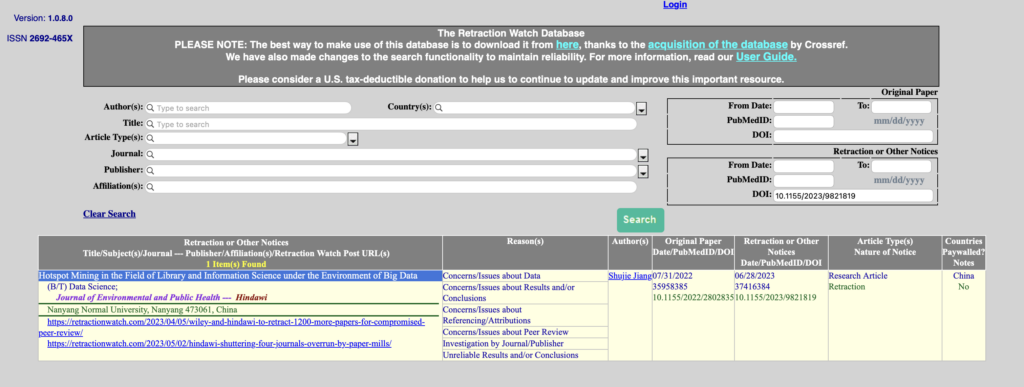
Retraction Watch search interface showing the main fields. Credit: TU Hamburg library, published 2026-02-23.
Filtering to retractions only: Because the database returns retractions, corrections, and expressions of concern together, you’ll want to filter to retractions specifically. Look for entries where the “Retraction Nature” field reads “Retraction” rather than “Correction” or “Expression of concern.”
Understanding the Reason taxonomy: Every record carries a “Reason” tag assigned by CSI’s research team. This is critical for students because not all retractions are equal:
- Author Unresponsive / Lack of Approval — procedural issues, often with no data-integrity implication
- Data Fabrication / Falsification — serious integrity violations
- Honest Error — genuine mistakes in analysis or methodology
- Duplicate Publication — the same paper published multiple times
- Ethical Violations — consent, animal welfare, or similar issues
A procedural retraction (Author Unresponsive) reads very differently from a data fabrication retraction when you’re deciding how to handle a citation. Always read the reason tag and the retraction notice before taking action.
Key Stats: The Retraction Watch database passed 63,000 records in early 2026. More than 10,000 papers were retracted in 2023 alone, a record, with hundreds more removed in mass batch retractions throughout 2024–2026 due to paper mills and compromised peer review (Springer Nature 200+, SAGE 678, and others).
The Easiest Setup — Zotero’s Built-in Retraction Notifications
Zotero has included automatic retraction checking built in since version 5.0.67 (released 2019), and it remains the simplest way to flag retracted papers, especially if you’re already using Zotero to manage your references.
How it works: When you add an item to your Zotero library, Zotero checks it against the Retraction Watch index. If retracted, it appears flagged with a warning. Click the flagged item to see retraction details.
If you cite a retracted item using Zotero’s Word processor plugin, Zotero will warn you and confirm that you still want to cite it. If an item is retracted after you’ve added it, Zotero warns you the next time you update citations; even if the item no longer exists in your library or was added by a co-author.
The privacy model: The full retraction data is stored on Zotero servers, but Zotero never learns which items you have in your library. For each item, Zotero calculates a non-unique identifier that could map to hundreds of publications and compares those against a partial list of retracted publications it retrieves from Zotero servers. Your library contents are never shared.
The 75% limitation is critical: Zotero’s built-in check only works for items with a DOI or PMID entered. That means approximately 25% of papers won’t be flagged. Pre-2000 articles, books, conference proceedings, and grey literature receive zero automatic protection.
⚠️ Common mistake: Assuming Zotero’s built-in check protects every source. It only works for ~75% of items (those with a DOI or PMID). Items without identifiers need manual checking through the Retraction Watch Database or Scholar Sidekick.
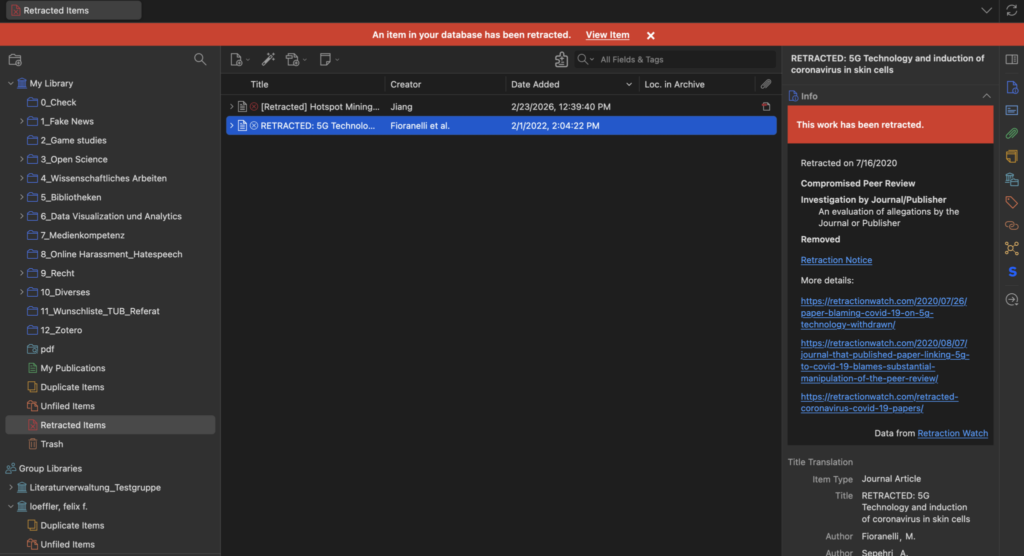
Zotero displaying a retraction warning for a flagged article. Credit: TU Hamburg library, published 2026-02-23.
Free Online Tools for Spot-Checking
When you need a fast, manual check on a specific paper, or when Zotero can’t flag an item because it lacks an identifier, these free tools are worth knowing about.
Scholar Sidekick Retraction Checker
Scholar Sidekick’s free tool accepts six identifier types: DOI, PMID, PMCID, arXiv ID, ADS bibcode, and paper URL. It resolves them to the correct record and checks for retractions, corrections, and expressions of concern via Crossref plus Retraction Watch.
What it returns: Each result shows a status badge along with the paper title:
- Retracted — formally withdrawn
- Expression of Concern — journal has raised concerns but not yet issued a final determination
- Corrections Issued — specific errors fixed; core findings still stand
- No Retractions Found — no notices on file
Nothing you enter is stored, and no account is required. The tool also has a public API (POST /api/retraction-check) for integration into scripts or automated workflows.
AnswerThis.io Retraction Checker
AnswerThis.io offers a retraction checker that accepts DOIs and paper titles and checks against Crossref and Retraction Watch data. The first 20 checks are free per browser session.
Crossref REST API and CSV Download
Since September 2023, Crossref has been the primary data pipeline for Retraction Watch retraction metadata. The entire dataset is available for download via GitLab, updated daily. You can also query retractions directly through Crossref’s REST API. This is the most powerful option for bulk analysis; downloading the CSV and running a local lookup is faster than individual online searches.
Retraction-Checking Tools Comparison
Different tools work best for different situations. This comparison table maps six tools across seven practical dimensions so you can match your specific scenario to the right option.
| Tool | Identifier Types Accepted | Best For | Cost | Student-Friendliness (1–5) | Real-Time Sync | Special Notes |
|---|---|---|---|---|---|---|
| Retraction Watch Database | DOI, PMID, title, author, journal, affiliation, date ranges | Deep due diligence, pattern analysis, journal-level audits | Free, no signup | 3 | No | 63,000+ records; 50-result limit per query; Reason taxonomy; best used alongside full CSV download for bulk checks |
| Zotero (built-in) | DOI or PMID only (enter in record) | Automatic checking of your existing library | Free with Zotero | 5 | Auto in library | Covers ~75% of items; no manual search needed; warnings appear in Word/Google Docs when citing retracted items; ~25% of papers (no DOI/PMID) get zero protection |
| Scholar Sidekick Retraction Checker | DOI, PMID, PMCID, arXiv ID, ADS bibcode, paper URL (6 types) | Single-paper quick checks, pre-import screening | Free, no signup | 5 | No (manual) | Resolves non-DOI identifiers to DOI first; public API available; shows status badges (Retracted / EoC / Corrections / Clean); nothing stored |
| Google Scholar (alerts) | None — automatic during search | Quick first-pass signal during initial literature search | Free | 5 | N/A (part of search) | Inconsistent coverage; depends entirely on publisher metadata compliance; absence of alert ≠ clean paper; red label as of Oct 2026 |
| AnswerThis.io Retraction Checker | DOI, paper title | Quick single-paper check when Zotero can’t find an ID | Free (20 checks/session), then paid | 3 | No | Lightweight option; limited free tier; useful as fallback when Scholar Sidekick is unavailable |
| Crossref Metadata Search | DOI only | DOI-based retraction lookup, bulk CSV analysis, automated scripts | Free | 3 | Via REST API | Most reliable for papers published after Sep 2023 (when Crossref integration launched); REST API supports automated bulk checks; full CSV download available via GitLab |
How to use this table: Check a single paper with a DOI? Start with Scholar Sidekick. Auditing an entire bibliography? Use Zotero as your first layer (~75% automatic) and spot-check the rest with the Retraction Watch Database. Biomedical research? Add PubMed’s retraction tags. Due diligence on a collaborator’s record? The Retraction Watch Database with its Reason taxonomy and downloadable CSV is the only tool that supports that depth.
What we recommend: For most students working on a thesis or major paper: manage references in Zotero for automatic library-wide checking, run spot-checks on papers without DOI/PMID using Scholar Sidekick, and before submission, do a full Retraction Watch Database + Crossref check on your entire reference list. This catches everything Zotero misses and gives you a documented audit trail.
What to Do When You Find a Retracted Paper
Discovering that one of your sources is retracted is unsettling, but it’s a normal part of scholarly research. Here’s what to do, in order:
Step 1: Read the retraction notice. Don’t just note “this paper is retracted.” Open the notice and read the actual reason. Was it data fabrication (high concern)? An honest analytical error (low concern)? Or a procedural issue like authorship (minimal concern)? The reason determines how seriously you need to take it.
Step 2: Evaluate scope. Determine whether you cited this paper as a core argument, supporting evidence, or background context. If foundational to your thesis, you’ll likely need to replace it. If peripheral, a single statistic, you might replace it with a non-retracted source or keep it with an explanatory note.
Step 3: Replace or keep with context. If only a single figure or analysis is retracted, the paper’s core findings may still be valid and citable. COPE guidelines clarify that retractions exist as a correction mechanism, not an automatic disqualifier of associated research. If you cite the paper despite the retraction, acknowledge it in your text or footnotes.
Step 4: Notify your advisor. If you’re close to submission, let your advisor know about the retraction and what action you’ve taken. Proactive transparency is always preferred to discovering the issue later.
If you’ve already cited a retracted paper and need guidance on remediation, updating manuscripts, notifying journals, or cleaning up reference managers, a dedicated guide on “I cited a retracted paper: what to do now” will cover that in detail.
Common Mistakes Students Make
⚠️ Treating “Expression of Concern” as “Retracted”: An Expression of Concern (EoC) means the journal has raised concerns and investigation is ongoing. The paper has not been formally withdrawn. It may eventually be retracted, corrected, or cleared. Don’t delete a citation solely because it carries an EoC. Wait for the investigation to conclude, or check whether the journal has issued a separate correction.
⚠️ Assuming no alert means the paper is clean: The Retraction Watch Database, Zotero, Google Scholar, and Crossref all have incomplete coverage. If a paper isn’t in these systems, that doesn’t prove it’s clean; only that you haven’t found a retraction notice yet. For thesis-level work, always do a manual title search on the Retraction Watch Database as a final cross-check.
⚠️ Deleting a citation without reading the retraction notice: Many retractions affect only a single figure, a statistical analysis, or a supplementary dataset. The paper’s core contribution may remain valid and citable. Read the notice first. It takes 10–15 minutes and can save you from unnecessary source replacement.
⚠️ Relying on only one tool: No single tool covers all retractions. Zotero misses ~25% of papers. Google Scholar’s coverage depends on publisher metadata compliance. The Retraction Watch Database is comprehensive but requires manual searching. Crossref is reliable for recent papers but doesn’t include historical retractions that predate the integration. Use at least two complementary tools for due diligence.
Retraction checking is a core part of research integrity. The combined workflow, Zotero for automatic library-wide checking, Scholar Sidekick or the Retraction Watch Database for manual spot-checks, Google Scholar for a quick initial signal, handles every case when all three are used together.
Your next step: Open your reference list and run every source through Zotero. For any item without a DOI or PMID, paste its identifier into Scholar Sidekick. It takes about ten minutes per source, but the peace of mind is worth it.
If you find yourself citing a retracted paper and need help finding a replacement source or restructuring your arguments around valid alternatives, the services page has expert academic writers who can help you pivot your research.